? QA Design Gurus: Srinivas Panyala
Showing posts with label Srinivas Panyala. Show all posts

May 10, 2016

My experience of testing a fundamental DB change in the presence of cloud product

How do you handle a situation of changing the basement of your 30-story apartment which is constructed many years back? 

Making changes to the DB of a complex Cloud platform or an existing cloud application is similar to the above situation. Isn't it? 

Let's assume we are working on a cloud platform, which provides many features to develop, deploy & monitor applications. We also keep on adding new features to the platform to maintain & increase the market share. When we introduce a new feature, we generally write a spec for it. We also write a test plan/test strategy for it. We do manual testing, automation, performance testing... etc. Finally, we certify and release it. Assume our cloud platform running on a java platform. Generally, a java based web application requires a database and a Web server. Whenever we introduce a new feature it may introduce new columns to the existing tables or adds a new table and also an extra piece of code for new functionality. To test these kind of features we generally certify SQL Scripts, new functionality and we test backward compatibility.


After a few years, the platform may require some database level change. If we come to this kind of situation, we should carefully test the entire platform. In this case, QA doesn't get any functional spec because it is not a new feature.
E.g. Database level change is modifying a column type from BIGINT to STRING.

This is a small change but it affects the whole platform. Generally, the platform provides features like UI, API & business logic. This small change affects all areas of the product like UI, API & Existing business logic. We recently tested this kind of change. We followed the below approach.

Certifying SQL Scripts

Migration case - Certifying update SQL Scripts.  We took the last released version of the product with some applications. Executed the SQL scripts. Observe that no errors displayed. We simulated the production environment and executed the SQL scripts. By doing this exercise, we can also calculate the production downtime. We also support multiple databases like MySQL, MSSQL Server, Oracle... etc. we have separate SQL Script files for each database. We certified them individually.


Normal case - Certifying create SQL Scripts. We took a fresh database and executed the SQL Scripts. We have executed SQL scripts on all supported databases.

In both cases, we defiantly get some defects like Syntax errors and some other errors because database uses different data types.

Verifying artifacts/business logic

This is the critical part. To test this, we should have an idea of the entire platform. We should be able to identify the areas/features going to be affected. In our case, to identify affected features we have gone through all check-ins made for this feature. We went through each file affected and noted down the affected features. Once we identified the features, we tested the functionality of each feature separately. Again here two cases we need to consider, existing artifacts and newly generated artifacts. As part of backward compatibility testing, existing business logic or artifacts should work fine after upgrade without any modifications. We can use all existing automation tests here. 

APIs Certification

As part of API certification, we identified the affected APIs. Most of the affected APIs will be APIs which accepts this affected column as argument and APIs which returns this column value in response. We executed all automation tests with existing configuration and with a new configuration.

Moving application/project between public and private cloud environments


This is one of the major use cases. Most of the cloud platforms are providing private cloud support along with public cloud to align with government rules. The private cloud also enables customers to customize the product (E.g. White labeling), so that they can increase their business. As we are supporting both public and private cloud environments, we can allow customers to move their applications between any environment. When we move applications between two different environments we definitely hit some issues.


This kind of database change looks like a simple change but validation is very hard.

Mar 30, 2016

Installing a new habit can improve software testing

In today's cloud world, and agile world, we are doing more releases than earlier. Organizations are working towards short goals and expecting more revenue. Due to all these QA engineers are getting more work than earlier. In the waterfall model, we used to write detailed test strategies and test plans. We used to get time for everything like feature testing, regression testing and automation. But now we are not getting time to complete all QA cycles. If you are working on a complex product/project, you can do only manual testing and you cannot complete automation in any case. Unit tests can help you but if you don't have unit tests in place then it is a tough time for QA engineers. Maybe you can consider UI automation but in these days UI also changing very frequently. UI automation requires regular maintenance and required more resources depending on the complexity of the product.

Assume that you love software testing, you love to find defects, you love to do automation and testing is your passion. You are perfectly suitable for this cloud and agile world. After few years, you may work overtime to complete schedules. As you are an experienced person you should complete the testing quickly and need to achieve other goals, so maybe a lack of sleep and time can prevent doing things you enjoy outside work. You stretch yourself beyond acceptable limits because you love to do the work. If it continues for a long time, it affects your health. You may easily miss the defects on the screen.
    
In these days, doctor's first question is "Are you a software engineer?" :)


What can we do here? We cannot change organization goals. We need to achieve more than last year to grow in the organization. Increasing the budget for the product/project or allocating more resources are not in our hands.

Install a new habit can help you in this case. A hobby should not be your passion and you should not make a profession as your main hobby. For example, professional athletes often play another sport in their spare time that they enjoy and that will help them do better in their primary sport. Enjoying hobbies help to bring a fresh boost of energy to get you going in your daily job. Everyone should have a hobby that can take them away periodically from what they do for a living, without constraints, goals, or targets, as you balance your job and your hobby.

According to scientists, to install a new habit It takes 66 days. Having a habit can definitely improve the software testing quality.

Test plans with Mind Maps

Generally, we write test plans/cases in a word document, wiki or a test cases management software. When we present to higher management or when we send it for review, they have to scroll down the entire document to verify the document. Generally, higher management may not have time to look at detailed test plan. We may end up with a few set of test cases which QA team thought and the respective developer may add few more cases. Sometimes developers also may not have full context. Developers develop a module and they can provide test cases related to that module. In this cloud world, every application we are integrating with many other systems. We are also providing a large number of features in a web application. Many organizations are offering development platforms over the web application. In this case, if we provide a detailed test plan with 50 pages, people may not be interested to read the entire document. Nobody provides comments unless we add a goal in appraisal document. :)

We need some creative way to present our test plan. Using mind maps, we can present our test plan in a creative way. Not only for review comments. We can use it to present in sprint review meetings. It also can be used for presenting a new feature to customers.
What is Mind Mapping?
A Mind Map is a graphical representation of ideas and concepts. It is a creative and logical way of advanced note-taking using symbols, colors, mind shapes, words, lines and images. This helps you to structure information, helping you to understand requirements in a better way, helps you to analyse, to cover the data comprehensively.

For example:

Let's consider, you want to write a test plan for browser testing. The below mind map depicts all test cases of browser testing. If we include this in test plan it gives full context in a glance. 


Example 2:

Let's consider, you want to write a test plan for mobile testing. It will be a very complex test plan.

I am sure it consists of various sections such as testing different mobile manufactures, testing UI, mobile apps, mobile web, security, performance etc. One way is to describe everything in a test strategy document. For summarizing everything you wrote there, you may use a mind map such as the one  below instead of writing 100 pages document.


As we all know visual aid is more powerful than any other mode of learning. This has proven many times that people will remember the creative visual aid than learning the things traditionally.

A famous quote - A picture is worth a thousand words

Many Mind mapping online/offline tools are available in the market.

Mind maps are easy to create and so natural. The following ingredients we needed to make a "Mind Map Recipe"
  • Blank unlined paper
  • Coloured pens and pencils
  • Your Brain
  • Your imagination!

It is good to follow some steps to make a Mind Map. Please refer to the following article for more details


Happy Mind Mapping :)


Jan 31, 2016

Software Testing and Cricket

I am trying to relate two irrelevant topics here :)

I see a few similar points in Software Testing and Cricket.

(Un)Predictability

In a cricket team, it is very difficult to predict a win or loss until the last ball is bowled. Unpredictability makes  cricket very interesting. In software testing, test plans are prepared, the tester is ready with manual or automation tests with expected behaviour. We cannot predict the application behaviour until we actually get the application to test, even though we know the expected behaviour. Unpredictability makes software testing very interesting and exciting.

Skills

In a cricket team, all players are skilful but  only a few players can make their team a winner by making hundreds of runs  or taking more wickets. In testing team also all team members are skilful but only a few people find many important bugs quickly. In both cricket and software testing, one needs to learn from mistakes, practicing and applying are the three golden rules to learn any skill.

Planning

A Cricket team analyzes their opponent team and prepares a game plan. This plan will change depending on the opponent team. In planning, they consider the opponent team's weakness and strengths. In a similar way, software testing also requires a plan before testing. A test plan which includes use cases of software, performance testing, security testing and environment...etc is prepared.


Handling Pressure

Handling pressure is most important thing in both cricket and software testing. In cricket handling pressure decides the victory. We can see many situations like in a few balls needs to score more runs. The player needs to score more runs when we have few wickets and needs to take more wickets in a short time. Similarly in software testing, many situations like we don't get much time to complete the regression testing cycle, sometimes we need to complete the testing with less resource and sometimes need to reduce the scope of testing.

Adaptability

In international cricket matches, you must have observed discussion on pitch conditions, the amount of grass and weather.. etc. Cricket players find difficulty playing in other countries. But players need to adapt to the conditions and need to perform depending on the conditions. In software testing also, there are many things they need to adapt to.Testers always need to have the quality adaptability.

Testers should not come up with following excuses. 


  • I have not tested anything like this before
  • This platform is completely new to me
  • I am new to this technology. I cannot test it
  • I am a manual tester. I cannot use this test automation tool
  • I need the domain knowledge before I can test this application

The last one, in my words, Software testing team is like bowling team in cricket. Although we contribute to the team’s success, failure to catch some important bugs are pointed out immediately. In cricket, in the last overs, players are required to score high run rate. In Software testing, testers get all the features for testing at end of the release.


The benefits of having Female Testers in Team

This article is not about saying one gender is more intelligent than another

In software industry each gender has equal opportunities when we compare with other industries. We still see less female members in each team. Each gender has their own unique qualities. Having both members in the team will drive the team towards success.

Men and women see the world differently. Hope everybody accepts it :). Women are good in some areas while men are good in some other areas.


Verbal Episodic Memory Tasks

Verbal episodic memory is the personal memory of events, places, times, emotions and context based on language. Women tend to be more adept than men at verbal episodic memory tasks such as remembering words, objects, pictures and other everyday events with descriptive language. These skills permeate the testing lifecycle, whether it is remembering conversations about clarifying requirements or recalling details of a defect found during test execution.Women have the ability to perform well in unit testing, black box testing...etc

Women generally remember more details than men as they need more details to understand. They need more words to understand a context as well as they describe with more words about a context. Men tend to need fewer words to understand a context and they describe a context with few words. This is because women utilize both sides of their brains when paying attention.


Visuospatial Episodic Memory Tasks

Visuospatial episodic memory is the memory of events, places, times, emotions and context based on the relationship of items in those memories to each other. Men tend to be more adept than women at remembering and describing events visuospatially. This is primarily, due to men’s usage of only one brain hemisphere when focusing on events. Men tend to have the advantage when relating one aspect of technology to another. In Testing, we use software to test a software. Men have the ability to perform well in multi-platform testing. 

As we have equal opportunities in this industry we can recruit anybody based on their skills irrespective of gender. It is good to consider the gender-specific skills and utilize them in the team effectively. Of course, this applies to any team.


Source : http://centricconsulting.com/why-you-need-female-testers-on-your-team/

Jan 8, 2016

Usability Testing of Push Notifications

In Today's Mobile world, Push notifications are playing a major role. Mobile users are expecting more from these Push Notifications. That's why Samsung  released a phone called "Samsung Galaxy Edge". It has a special notification bar.


Mobile App testers need to concentrate on these push notifications testing. We mostly concentrate on functional testing. We also need to concentrate on Usability testing.


Consider the Application, Device and OS

Each OS provides their own built-in libraries to use this push notifications features. Developers use these libraries in their code when an application requires sending a notification. Notification behaviour would have depended on OS and Device.

QA team need to make sure that each notification behaves similarly on all the supported OS and Devices. It is important that app should have a consistent behaviour on all devices. It helps to grow the business.

Application is in background (not in opened state)

When an application is not opened, notification should  be displayed on the notification area. If that application has a new message then it is good to display the sender  info and possible message content (may be the first line). This helps the user to decide whether he/she needs to open the application or not.

When the application has more new messages then it is good to show the number of messages count with sender's info.

The notification also can be displayed on the app icon. E.g New unread messages count.


Application is in opened state

When an application is in opened state if any new messages are received then notifications shouldn't be displayed. If displayed user may feel uncomfortable. The application should be updated with new messages. If the application requires any manual interaction to load the new messages then the application should display a notification on the application UI with an option to do the refresh operation. In this case, device notification area shouldn't be used.

When the device is locked

This is one more area where notifications are displayed. These notifications help the user to decide whether the user needs to unlock the device or not. This option has more space to display the notifications.
When multiple applications have notifications in this place, it is good to display app name, sender name & possible content..etc. If only one application has a new message then it is good to display the entire message content, so that, the user can read the entire message without unlocking the device. Maybe some privacy concerns will be there.


Dec 14, 2015

What is Kerberos Authentication? How to test it using fiddler

In every organization, employees use many applications in their day to day life. E.g. Project Management, Leave management, IT support, Timesheet...etc. All applications may not be provided by one vendor. Each application has its own authentication mechanism. Each employee needs log into these applications daily. Redundancy of entering the same username password on a daily basis for all the internal applications by Employees can be eliminated by implementing the Kerberos Authentication. Using this Kerberos Authentication, we can authenticate the user automatically if that employee is in the same private network. Most of the organizations are using Windows operating system and Active Directory authentication for their Desktop/Laptops. Many application vendors are also supporting this Kerberos authentication.

Kerberos is a network authentication protocol. It is designed to provide strong authentication for client/server applications by using secret-key cryptography. It has the following characteristics:
  • It is secure: it never sends a password unless it is encrypted.
  • Only a single login is required per session. Credentials defined at login are then passed between resources without the need for additional logins.
  • The concept depends on a trusted third party – a Key Distribution Center (KDC). The KDC is aware of all systems in the network and is trusted by all of them.
  • It performs mutual authentication, where a client proves its identity to a server and a server proves its identity to the client.


Ref:https://msdn.microsoft.com/en-us/library/Bb742516.kerb01_big(l=en-us).gif

Manual testing

Once the application is implemented with this Kerberos authentication, then the user should be able to access the application without asking login credentials. The application should have an account with the same login name.
 Open any browser and access the application. It should automatically provide the access to the application.
 Sometimes it may not work this authentication, if the DNS server has any problems. Client machine should be able to ping the application hosted server machine and the same IP should be shown at server side if we execute the ipconfig command.

Enabling Kerberos Authentication in Firefox


Firefox does not automatically perform Kerberos authentication against any sites. You must manually add sites to a trusted sites list.

To enable Kerberos authentication in Firefox:
  • Open Firefox and enter about:config in the address bar. Dismiss any warnings that appear.
  • In the Filter field, enter negotiate.
  • Double-click the network.negotiate-auth.trusted-uris preference.
  • This preference lists the trusted sites for Kerberos authentication.
  • In the dialog box, enter the domain, such as abc.com.
  • Click the OK button.
The domain that you just entered in the network.negotiate-auth.trusted-uris should now appear in Value column. The setting takes effect immediately; you do not have to restart Firefox.

Testing using Fiddler
  • Download and install the fiddler software at client machine, not at the server machine http://www.telerik.com/fiddler
  • Start the fiddler. It automatically captures the traffic
  • Access Kerberos Authentication enabled application in any browser E.g., Chrome
  • Fiddler captures all requests and displays in left-hand pane
  • Click on first successful(200) request
  • Click on "Inspectors" tab, then "Request Headers" section -> Headers
  • Look for the "Cookies/Login" section or "Security" Section
  • If you see the Authorization token begin with “YII” then Kerberos is functioning, if you see “TlR” then Kerberos did not function
Kerberos Working
or


Kerberos not Working


Dec 6, 2015

Graphical Test Planning - A picture is worth a thousand words

In software testing world, we write test plans with some list of test cases. A tester writes a test plan for a feature and sends it for review. Higher management and developers will review the test plan and provide their comments. Tester incorporates those comments. Higher management may not have time to read the entire document, thus ending up with only developer's review comments. Similar to architect diagrams in feature's functional specs, test plan can accompany a picture to explain the testing flow/scenarios.

Graphical Test Planning(GPT) is a way of creating a test plan without the need to write entire documents. This methodology was created by Hardeep Sharma of Citrix Systems. GPT helps us to find design-level issues at the earliest.

What a Graphical Test Plan is:
  • A structured relationship diagram
  • A list of behavioural areas that need to be tested
  • A method of getting greeting feedback about what needs to be tested
  • A method of tracking progress of design and execution of testing
What a Graphical Test Plan isn't:
  • A flow diagram
  • A QA manager's thoughts or mind map
  • A feature list
  • A hand-holding exercise for a test engineer on how to use the application
Ref: http://event.dnd.no/ttc/wp-content/uploads/sites/39/2015/01/David_Bradley.pdf


Advantages of this methodology

• Enables people to understand and work with complex systems
• Describes the exact behaviour we expect to observe from the system
• Find bugs from the beginning of the project
• No waiting for documents, code, etc.
• Be an integral part of the whole project lifecycle
• We understand the system better
• Communicates knowledge and understanding 
• Verifies the design
• Enables good Project Management & Control 
• Provides flexibility and agility
• We improve the system design
• Discover inaccuracies and ambiguities
• Identify potential design issues
• Ensures the RIGHT product is built
• Many people can contribute. Not only testers any person who is involved in this project can contribute to this GTP. Architects, PMs, UX, Dev, QA..etc 
• Test against the confirmed behaviour, not implementation


Nov 30, 2015

How to improve QA team's product knowledge

Generally in Product QA team, manager/lead assign some components/features to each person and they become an expert on that feature. Each team member should have the knowledge on the entire product not only on a particular feature. This will help to improve the quality of product and reduces the risk for the company if some team changes are required. Each team member wishes to learn about other components/features, but they hardly get time to learn. We can create opportunity in the following ways.

Conducting training or technical sessions

Training will be benefited if we are forming a new QA team. Instead of each person learning about the product one lead/manager should provide some training to the team. This will save team's time and everybody will start from the same page.  Each team member should conduct technical sessions on their expertise feature. This will help other team members to learn about all the features of the product. This not only improves product knowledge in the team, but also improves the communication skills of the team members.

Sprint Reviews

Ref: http://agiletrick.com/wp-content/uploads/2014/05/Review-Meeting-300x155.png
QA team should attend each and every sprint review and listen carefully about stories presented by other team members. This will improve knowledge on new features. Somebody should maintain sprint review demo recordings. This will help us if any team member misses the sprint review. QA team should practice to give the demo for completed features in sprint reviews.


Answer a forum/support issue every day

Ref: https://goo.gl/RnVU7K
Answering a forum issue is a good practice to learn about the product. Even if we don't know the answer if you spend some time on that issue you will get the answer. If you cannot figure it yourself then you should contact respective dev owner. I am sure they will help you. Don't  worry if anybody answers that question before you. Still you learned something about the product. Management also should allocate some time for answering forum questions. This will improve customer support as well as team's product knowledge.


Changing QA owners for each release

This will provide an opportunity to each team member to get hands on exercise on each feature. When we provide ownership, team member will feel responsibility for that feature and put 100% effort to learn and test. It helps to reply forum threads quickly and also feels like missed the scenario or learn about a corner case if any customer reports any defects on that feature.

Conducting Product Quiz

Each team member can prepare some list of questions on their expertise feature. Conduct a quiz within the team. Each question can open a discussion and at the end of the discussion somebody (Lead) should note down some notes. This should be a fun activity, not a serious one.   

What is Touch Time? How it impacts Delivery

 In agile model, Dev engineers and QA engineers work on a story and deliver it at the end of the sprint. Touch time can be defined as the "The actual time spent developing a product or service with the ultimate goal being the addition of value to the end consumer". Let me take the following imaginary scenario to explain this concept.

A dev engineer completed the development of the story in 1 hour on Monday. QA engineer needed to start verifying it on Tuesday morning, but as QA engineer is already busy with another story, he couldn't pick it up. QA engineer verified that story on Wednesday in an hour and logged a critical defect. Dev engineer couldn't pick that defect immediately and he fixed it on Thursday in 1 hour. QA engineer picks it on Friday and closed the story. In this example, actual time spent on this story is 4 hours and story marked as completed in 40 hrs. Here the Touch time is 10%.

Why do we do multitasking

As part of resource utilization, we want to do something instead of waiting for a task to become unblocked. That exactly happened in above example. If the team multi-tasked to fill the waiting time, how many features get done? Few features or likely much fewer.

Single Tasking and Partner Pairing

In this Single Tasking approach, developer and tester becomes a small team, and work on a single task/story. Developer thinks about implementation and tester thinks about test cases. They should interact with each other. Tester can understand the implementation and developer can the understand about the advanced test cases. E.g. what happens if we enter internationalization characters. Tester can also prepare the automation test. If we follow this approach both will benefit and they can deliver the next story with more quality as they know how developer and tester thinks. We need not follow this approach if our current approach Touch time is ok. Need to consider other tasks like planning and deployment while calculating touch time.

single tasking is not realistic as we need to catch up on email, meetings, support calls ... etc. We should calculate Touch time frequently and we need to work on changes to reach reasonable Touch time.

Ref: https://hakanforss.files.wordpress.com/2014/08/flowefficiencyformula.png


Oct 31, 2015

How VMware Snapshots can save QA engineer's time

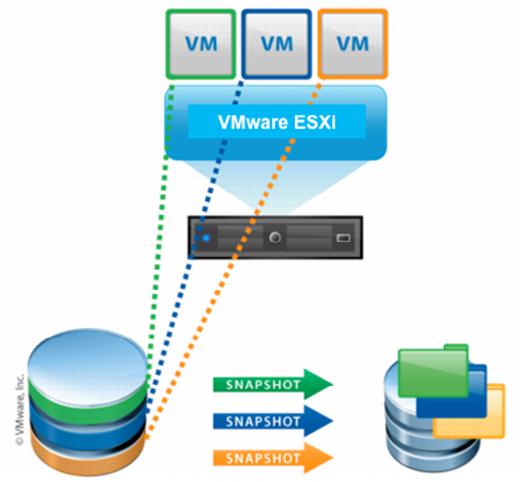
QA engineers generally spend a lot of time on installing software to setup the required test environment. VMware snapshots can save QA engineer's time in setting up the test environment.

Testing migration cases

Assume that you are executing a migration test plan. You have installed the first version of the software and executed some scenarios which are required for migration testing. Now you upgraded the software with say version 2 and executed the migration cases. Now you came to know that you missed one scenario or some extra cases got added to your migration test plan. To test this missed/extra test cases you need to install the software with version 1 and execute the scenarios required for missed migration cases. In this case, if you choose VMware instead of physical machine then it can save your time. After installing version 1 software you need to take the snapshot so that it can be used in future.

Ref: http://goo.gl/CZwl3g


Verifying customer issues

When a customer reports a critical case and assume in order to reproduce that case, you need to set up test environment which includes a lot of third-party software. To verify this case for a major release, you installed all required software and reproduced the issue successfully and upgraded the test environment with fixed version and you verified the issue. Now management decided to release a hotfix or service pack for this issue. You need to do the same work again to verify the same issue for hotfix/service pack release.  If we take a VM Snapshot after reproducing the customer issue then it can save QA time.

Maintain a VM snapshot for each release

Generally, any software release may have major, minor and hotfix releases. QA always works on current release. When we found an issue generally dev/higher management wants to know if it is a regression issue or a new issue. To find that QA may need to verify the issue in old release. In this case we need to install the previous version software. Another case for example may be as follows: customer reported an issue with some old version of product. QA/Support needs to install that particular version  to verify that issue. If we maintain a VMware snapshot for each release it can save QA time and sometimes Dev or Support teams time also.


Tip: How to use XPath in Web UI Automation(Telerik Test Studio)


The biggest challenge in Web UI Automation is finding an element in a dynamic web page where we have more than one similar elements. In these days, web pages in most of the cloud applications are auto generated. Even though we provide a unique id for each element we cannot rely on these ids as they are auto generated. Enterprise automation tools provide element repository and we can add some conditions to identify the element. This solution may not work sometimes. In this situation, using XPath we can easily identify the element. Most of the open source and enterprise automation tools supports XPath.

Ref: https://goo.gl/YCRnQX


Frequently used XPath elements examples as follows. I used Telerik Test Studio enterprise automation tool APIs in below examples

1) following-sibling

 For example, let's assume you have many check boxes in a web page. You want to find 3rd check box. You need to find a unique text near to that text box. Using that we can find that element using XPath. Assume text "three" is unique text nearby that text box. You may write XPath such as the one given below

Element e = Manager.ActiveBrowser.Find.ByXPath("//td[text()='three']/following-sibling::td[1]/input");
Manager.ActiveBrowser.Actions.Click(e);

2) preceding-sibling

//a[text()='three']/parent::td[1]/preceding-sibling::td[2]

3) parent

//a[text()='three']/parent::td[1]/preceding-sibling::td[2]


Example: 

If you want to click on the check box of particular email then you use the following XPath.

(//span[text()="SearchString"])[1]/parent::div[1]/parent::td[1]/preceding-sibling::td[3]/div

Here "SearchString" can be an email sender name. The above XPath returns the first occurrence.

You can use the following XPath to get the value of check box.

(//span[text()="SearchString"])[1]/parent::div[1]/parent::td[1]/preceding-sibling::td[3]/div/@aria-checked


If you find at least one unique string in the web page then you can traverse the page to find your desired element using XPath

Oct 23, 2015

Tip: How to get the IP Address of Raspberry Pi when performing IoT Testing

As a tester when we test any IOT application, we need to know the IP Address of  Raspberry Pi. Even if you know the IP Address when you test the application on another network, again you need to find the IP Address.

Generally, you can find the IP Address of your machine using ifconfig/ipconfig command if it is already connected to a network. To execute this command on Raspberry Pi, you need to connect using any command line tool like Putty. To connect Raspberry Pi using any command line tool you need IP Address.

Using the following ways you can get the IP Address of  Raspberry Pi.
  • Using IP scanner tool:- There are some IP Scanner tools available in the market. For this, your PC and Raspberry Pi should be on the same network.
            E.g. "Advanced IP Scanner"


Ref: http://goo.gl/16dqGb

  • Using Mobile App:- You can find the Raspberry Pi address in any home network easily using "Wifi Watch" mobile app. You can just connect the ethernet cable to Raspberry Pi and scan the network using this app. It lists the Raspberry Pi with it's IP Address.
Ref: https://goo.gl/24xIqZ


Above options will work only if you use the ethernet cable to connect the network. The network should connect automatically without typing any password.

If you use WiFi, to connect the network you need to type the password. One way of finding is, you should connect Raspberry Pi to TV using HDMI cable so that you can see the desktop. You need to connect Keyboard to type Wifi password. Once the network is connected you can type ifconfig command on the terminal to get the IP Address. Next time onwords you can use above mentioned tools to find the IP Address.

Instead of using these tools, we can get the IP Address automatically when Raspberry Pi is rebooted. 

Steps:

1) Write a Python script to find the IP Address
2)  Add logic to send the IP Address to an email or to any endpoint
3) Create a Cron job to run this python script on system reboot

Example:

In this example, we are sending IP Address to a cloud application built using Progress Rollbase. Python Script invokes a REST Service to send IP Address. Rollbase application triggers an email to user.

import socket
import os
import urllib2
gw = os.popen("ip -4 route show default").read().split()
s = socket.socket(socket.AF_INET, socket.SOCK_DGRAM)
s.connect((gw[2], 0))
ipaddr = s.getsockname()[0]
gateway = gw[2]
host = socket.gethostname()
response = urllib2.urlopen("https://www.rollbase.com/rest/api/login?loginName=xxxxx&password=xxxxx").read()
start = "<sessionId>"
end = "</sessionId>"
token=(response.split(start))[1].split(end)[0]
ipRequestString="https://www.rollbase.com/rest/api/create2?sessionId="+token+"&objName=configObj&ipaddress="+str(ipaddr)
print ipRequestString
urllib2.urlopen(ipRequestString).read()
print ("IP:", ipaddr, " GW:", gateway, " Host:", host)


Cron job:

To open Crontab editor in Vi Editor
Open terminal and execute export EDITOR=Vi
Execute "crontab -e". This will open a Vi Editor.  Enter the following line and  enter Esc + shift colon + w +  q to save the file.

@reboot sleep 60 /usr/bin/python /home/ipaddress.py


Oct 13, 2015

Forgetfulness plays a major role in QA engineers life

Forgetfulness plays a major role in everybody's life. In QA engineers life, forgetfulness can be an expensive thing.

Assume you are executing a test plan, and you have some more minor/average cases in your mind to be executed. You want to execute those cases after completion of the test plan, but you forgot to execute them, or you found a minor/average defect during the test plan execution itself. You planned to log that defect later as it is a minor/average defect. If this defect is reported by a customer then it is an expensive thing, and we always get a question like "Why QA missed it?".

We should report defect immediately whenever we find. We should not move to next case until we report all issues we found.

A few of the scenarios that came to my mind are listed below

A junior engineer wrote a test plan and sent for review to a senior engineer. Senior engineer forgot to review the test plan. Junior engineer reminded twice, but senior engineer forgot due to some other tasks. Junior engineer might have missed some important cases. Customers may report issues on those missed cases only.

We should review the test cases without fail.

You found an abnormal behaviour of product/project and you are not sure that it is a defect or not. You want to get confirmation from the developer or higher management. At that time, both are not available. You may forget to discuss it with them. Customer may find a defect in the same case.

We should clear our doubts with Dev or higher management. If they are not available we should drop a mail at least.

Assume you got a critical bug to verify for a major release which is planned 5 months later. That defect verification includes a lot of integration steps and also includes third party settings. You interacted with developers and searched in google and found all required steps. You set the environment and verified that defect. After 3 months, one customer asked for Hotfix release with this defect or our higher management planned for a service pack release with this defect. Now you need to verify this critical defect again which includes a lot of steps. You might have forgotten all these steps required. You need to interact with developers and search google again for the same steps. A lot of time will be wasted.

A final scenario where we should realise why documentation, not liked by most of us, is actually very important!

One of our team members verified this critical defect for the major release and  resigned. Some other team member needs to spend the same amount of time.

The key to some best practices to be followed by QA is, to document all the steps required to verify a defect.