? QA Design Gurus: automation testing
Showing posts with label automation testing. Show all posts

May 15, 2016

Practical Experience: Taking Stance On Test Automation

Practical Experience: Taking Stance on Test Automation
It was a year and half ago that I was a bystander of an argument that has repeated itself a dozen times since. Which combination of programming language and supporting tool was better for automation system all across: Java with Sahi or C# with Telerik Test Studio. Each side blew-up weighty arguments: what is easier to do in each language, what language has better libraries, which tool has more flexibility, etc.
Who is right?
It is difficult to settle the argument entirely based on technology characteristics. Because, each language/tool has few aspects where it is better than the other. It is equally hard to judge which attribute is more important to be able to make a decision.
It is an Organizational Decision!
Now, it requires context-switching where we lose some time recalling/adapting to details of the language. It is very important for one to realize and scope the time that it requires for the engineer’s transition and that it requires to maintain existing automation. When the code is not written in the language the engineer prefers, the development and maintenance becomes as likely as not.
How to strategize for test automation in new Language?
Plan to achieve small success and grow. It is not possible to try automating the whole regression suit. Instead, try things, make mistakes and design even better approaches. This process never ends but at a certain point in time you achieve reasonably stronger point of view of the capabilities of the language or the tool. It helps drafting next generation of frameworks that sustain (as they should) over the life time of the product-under-test.
Automation is full time effort, not a side-line. Sometimes automation is extremely underestimated. Again, by starting small and growing, estimating the work can be gauged.
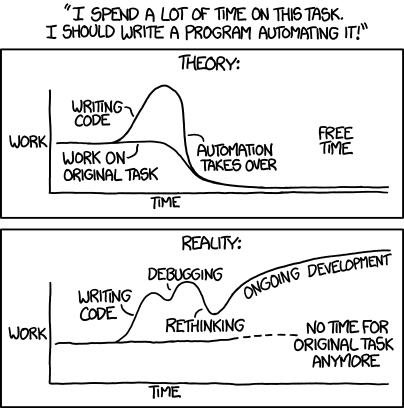
What if even after evaluating the new tool, there isn’t any clear choice? At this point the choice does not matter. The important thing is that we do choose one because the delay may be costlier if you made the wrong decision. Get the team to back whatever the outcome is, follow through with supporting that language.

May 10, 2016

Eleven Web UI automation best practices for better results

A few best practices for Web UI automation:

1)Having better Setup and Cleanup code

                Make use of better and stable Setup and cleanup that executes before and after the test execution respectively. This helps to avoid most of the dependency issues and provide robustness to your tests. As a example making use of REST or SOAP services to as setup and cleanup code will ensure the stability of the tests.

2)Identifying an element with stable property

                With the adoption of agile methodology and Cloud based applications most of the Web UI changes frequently to attract customers. This results in failure of Automated tests. To overcome the issue, Identify the element in the UI with more stable property. Using Dynamic ids are tag index will result in instability of the tests.

3)Making use of Reusable components

                Consider making the reusable steps as Utilities or functions, which results in faster development and maintenance of tests. Making the fix failure in the function results everywhere it is being used. Initial days of Automating a UI may not have utilities or it is difficult to decide whether to make set of actions as utility or not. Moving to further development utilities grows in incrementally and adds value to the development. Reusable components should be thoroughly tested since it will be used by multiple tests.

4)Better usage of Wait Statement

                Identifying an element may fail since the finding logic may have executed before the entire UI is loaded. So Simply using Wait statement may not be wise idea. Better to wait for a particular element in the UI rather than standard Wait statement. This ensures that following steps will be executed only after the UI is loaded.

5)Improving the readability of Tests

   Readability can be improved in many ways, below are listed few:

·         Keep the tests simple and short.
·         Name the test case such that it will reflect the purpose.
·         Provide better and meaning full names for the Elements in Element Repository.
·         Identify Element in UI with minimum set of properties.
·         Provide better name to step.

6)Consider different ways of identifying an element

                Conventional way of identifying an element using Element property directly may not work or there may be multiple elements with same property in such cases, trying the alternate ways may lead to better results below are few:

·         XPath: This can be used to find the relative location of an element if the element is not unique.

·         JQuery : We can perform complex browser actions using JQuery where conventional methods may not work.

·         Parent–child: Sometimes child element may not be unique, considering parent tag and navigating to child may result in uniqueness and stability.

7)Maintain Element Repository Globally

Make sure that Elements in the element repository is unique and reuse where ever required this makes easy maintenance and fixing of the test. Fixing a single element will be reflected in all the places it has been used. Though this have negative impact such as duplicate entries of elements, searching an element this can be overcome by following some conventions for the Elements.

8)Make use of services in UI Automation where UI Automation is not mandatory

Can make use of services like REST or SOAP which can perform some action that is not mandatory to test using Automation tool. This makes tests shorter and increase reliability, since the services are more stable than UI.

9)Scenario based testing over functionality based testing

Develop the test based on the scenarios that will cover the multiple functionality of the elements. Unit tests will ensure that basic unit part of the code is working fine hence focusing more on the scenarios that covers multiple functionalities will result in wider coverage of tests.  

10)Generating Custom Report for better debugging

Make use of Report generated by the tools if found that is difficult to debug. Develop the Custom report such that it will ease the debugging time.

11) Keep tests to a reasonable length


As a fact that long tests takes more debugging time considering shorter ones. It is better to keep the tests short and simple.


Advanced Xpaths

Here I am going to discuss advanced usage of XPaths.
I will provide examples how to use XPath Axes.

Descendants
A node's children, children's children, etc.
In the following example; descendants of the form element are the div, title, author, year, and price elements


<form>
<div>
  
<title>Harry Potter</title>
  
<author>J K. Rowling</author>
  
<year>2005</year>
  
<price>29.99</price>
</div>
</form>


Here is Example:
If you want to find descendants of Div tag you need to use below syntax

//div[@id='browse-category']/descendant::*


If you want a specific element from descendants then use below syntax

Here I want to identify Payment link using descendant.
//div[@id='browse-category']/descendant::a[@data-category='Payment']

In the above example, the descendant will search for child elements and child's child elements as well.

UL is the child element for DIV and LI is the child element for UL and A is child element for LI. As we used descendant it will check for the matching element.


Following:
Selects everything in the document after the closing tag of the current node.


selects all elements after closing tag of P

//p[@class='fk-font-14']/following::*
if you want a specific element using following below is the example

//p[@class='fk-font-14']/following::div[@id='fk-mainfooter-id']


Following-sibling:
Selects all siblings after the current node.
//div[@id='browse-category']/ul/li/following-sibling::*
if you want a specific element then

//form[@class='faqsearchform']/following-sibling::div

Preceding :
Selects all nodes that appear before the current node in the document, except ancestors, attribute nodes, and namespace nodes

preceding-sibling
Selects all siblings before the current node

Here is the example:

//div[@id='browse-category']/preceding-sibling::form
Now Let us see a real time example how to use the above-mentioned XPath Axes:

Below is scenario:


  1. Navigate to Flipkart
  2. add two products to cart
  3. I want to remove one product based on its name.
Simple xpath without using product name --- //a[@class='cart-remove-item fk-inline-block fk-uppercase'] but it always identifies first Remove button.


First Step: I will identify xpath for product Name

//span[text()='HP 15-af114AU Notebook(AMD Quad Core A8/ 4GB/...']

From there onward using XPath Axes I need to identify Remove link.

By looking at DOM we can understand that there are two TR tags 
in one TR --we have product details and in another TR, we have remove link.

so I have to traverse to the second TR.

Second Step: Inorder to do that I need to traverse to parent element of span

//span[text()='HP 15-af114AU Notebook(AMD Quad Core A8/ 4GB/...']/ancestor::tr[1]

Third Step: from there traverse to sibling of TR
//span[text()='HP 15-af114AU Notebook(AMD Quad Core A8/ 4GB/...']/ancestor::tr[1]/following-sibling::tr

Fourth Step: From there traverse to tag A which has link text of Remove..here is the final xpath

//span[text()='HP 15-af114AU Notebook(AMD Quad Core A8/ 4GB/...']/ancestor::tr[1]/following-sibling::tr
/descendant::a[text()='Remove']


Hope this is useful in writing advanced xpaths.

Automation Testing


Automation testing is a best practice and effective ways in finding bugs.  We all are familiar with the benefits of automation such as correctness, increase in speed, effective, decreases cost, saves time and money. A part from all the benefits a tool provides, it is equally important to choose a suitable tool for your application.


Automation Tools:

There are various tools available in the market from open source tools to licensed ones. One has to evaluate the different automation tools available before choosing the right tool, whether it might be for GUI automation, Web applications automation or a mobile device automation.  
In automation phase, we should firstly think of the categories of What to automate, what not to automate cases. Then most importantly on cannot be automate cases, as 100% automation cannot be possible by any automation tool. 

What to Automate:

Before automating the test cases/features it is a good practice to start automating the cases based on the priority. High priority cases should be automated first and then continuing with the rest of the cases. One has to pick the cases which can be automated Automation has to be there for the complex cases which involves different permutation and combinations as it reduces the manual effort and cost.
It is difficult to test various kind of testing types manually such as performance testing, load testing, stress testing, etc., which can be effectively handled by automation. Thus automating these testing types helps in delivering a quality product.

What NOT to Automate:

It is always good to automate all the possible cases in a feature and it is also important to ask a question yourself before automating, that does this has to be automated or not?  As in agile model, we will be segregating and delivering an application in different sprints/iterations we have to check for the stability of UI or application before automating. Also there will be onetime things which is sufficient to check manually rather than automating.

Cannot be Automated Cases:
As said, we cannot achieve 100% automation by any tool. Quality Software testing should be a blend of manual testing + automation and not alone automation testing, because certain things can only be captured by human eye and not by tool like usability testing, Ad-hoc testing, look and feel of the GUI, etc. 


100% PASS Criteria: 

Do not be overwhelmed if your tests are 100% passing for 24/7, there should be some serious problems in the scripts/tests you have written. Confused? Ok let me clarify this, when your application is changing everyday by someone and you think that it does not break any of the existing functionality? Is that be possible? No right? That’s how it is, as we are humans and we may commit mistakes/errors in the code which will also effect the existing functionality. Recheck the verification points of your tests/scripts it may miss the bugs.

Script NOT Well written?

Don’t be panic if a script fails, as said 100% pass criteria is a not a metric of quality. Analyzing the failure and finding the root cause of the failure helps in knowing whether it is a script error or a bug in the application. Let us consider that test is failing to recognize a pop-up dialog and we think that is a timing issue and keep on increasing the wait time leads in missing a performance bug. A memory leak after running few suites happens while running the suites does not show up if you run a single script. So proper analysis is a must thing to do when a script fails before concluding or modifying the script.

Conclusion:

As automation testing is very important, choose the right tool for the best results. Prioritize the testcases for automation as per the manual effort or cost. Automate the cases which can be automated. Finally, after completing the automation if script fails analyze the failure and report the bug if found.