? QA Design Gurus: divyatheja pachipula
Showing posts with label divyatheja pachipula. Show all posts

May 9, 2016

Mantra to catch security issues – Repeat the test 10 times and note down every parameter


Sometimes, to identify security flaws in our applications, we don’t need a tool. By repeating a simple test multiple times, we can easily find the security flaws in our application. Following are a few ways to find security flaws by the mantra:

Session ID Sequence
Generally, a Session ID will be created once after the user logs in to a website and used to maintain session or state for that particular user interacting with website.
A few web servers generate these session Ids just by incrementing a static number instead of using a complex method or algorithm which generates random session Ids. These kind of security issues can be found easily by testing a scenario repeatedly.
When a test is executed for the first time, note down the session id parameter value. Repeat the steps for 10 times. If you observe that the session ID is being increased by a static number or some predicted randomness, then it’s easy to crack and your web application is at risk.

Captcha sequence
Captcha, an image with different alphanumeric characters is used to differentiate human and robots while logging in to the websites.
It is really easy to notice the pattern of the captcha if we repeat the test. If we note down the captcha each time the test is executed, it’s easy to find if captcha’s follows a particular pattern or algorithm. Check and see if you can predict a patters between words. Another way – Repeat your test for 100 times. One predicted randomness is to have 100 captchas and then rotate them randomly. Definitely crackable, right?

Number of login attempts 
Write a test to login with wrong credentials. Repeat the test. After a particular login attempts, if the application login is still active, then it’s a major security flaw and can be broken by brute force attacks. If there are different login attempts, the web application should block authentication for a few hours and then block completely after a specific number of attempts.

Security issues can be easily found by following the mantra – Repeat the tests and try to find a pattern. Isn’t this the way hacking works?

Image references:
http://tr1.cbsistatic.com/hub/i/2013/08/05/1b80a46a-99ff-4c01-a4a8-36c5e6be326a/Kill%20Captcha.png


Mar 25, 2016

Are you QAing a mobile application?

Have you started working on Mobile Application? Are you considering all aspects of testing when QAing a mobile application.

Following are few testing aspects that we should consider while testing mobile application:


Functional Testing
  • Validation of functionality
  • Smoke/Regression testing
  • Offline access testing
  • Negative testing
  • App sync/data between devices
Interoperability
  • Voice/SMS
  • Push Notifications
  •  Battery removal

Performance
  • CPU usage testing
  • Network usage
  • Page render time
Connectivity
  • Network strength/recovery/outage
  • Peripheral testing
  • Connectivity (Pairing issues, WIFI)
  • Compatibility testing with devices
Memory
  • Memory usage
  • Memory leaks

Installation
  • New App install
  • Uninstall and re-install
  • Upgrade testing
Usability
  • User experience
  • Competitive analysis
  • Expert review

Security testing
  • Test vulnerabilities
  • Project user data
  • Compliance with regulations
  • Data Encryption
I18N testing
  • Language support
  • Images and text
  • Currencies
  • Timezones
  • Context


source: http://adventuresinqa.com/2016/02/01/wearables-guest-post/

Dec 27, 2015

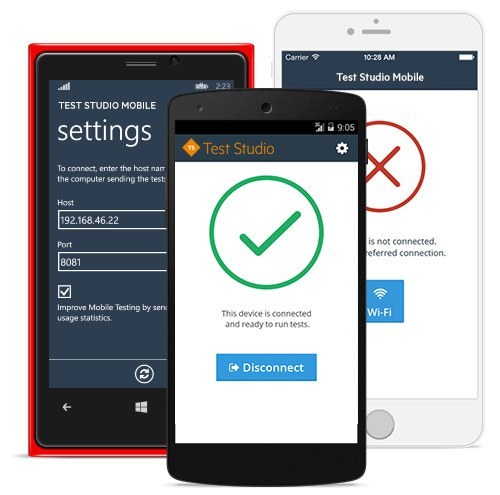
Mobile App Testing with Telerik Test Studio

Over the last few years, Mobile Applications development has grown exponentially. QA needs to ensure that every mobile application meets high quality. Testing mobile applications is complex and difficult compared to desktop and web applications. In mobile world, with frequent OS upgrades, new devices support, it is really complex to test mobile apps and to automate testing.
We will be able to solve these kind of issues with Telerik Test Studio Mobile.


It allows developers to write automated functional tests in JavaScript using a set of APIs we devised to make the process as easy as possible. With Test Studio, we can run automated tests on real devices as well as emulators. All we need to do is to install Mobile Testing agent on the devices we need to test. Agent will take care of connecting mobile device to our test studio script.

Nov 20, 2015

Let QTP monitor your application's performance


While working with our applications, we see our application's performance going down on performing a particular action. Reasons for this might be different. We mainly see these kind of issues when resources reach its capacity. Resources can be CPU resources, memory, application, physical disk and network resources. So, finding these kind of bottlenecks is difficult in manual testing. If you are using QTP to automate your testing, then you have a solution for this.

Ref: http://goo.gl/FXePGx


QTP provides a functionality called Local System Monitoring. Enabling this functionality for a particular script lets QTP monitor and record resource usage for each and every step performed. Finally, it shows a graph with resource usage statistics. When a particular step is selected in result, corresponding resource stats will be shown in graph. So that, it would be easy to know on which action in application, performance is going down and the reason for this (memory leak/thread leak/gdi object count, etc..). In addition, you can export data from the System Monitoring tab for a variety of file types.

Following are few simple steps which need to be performed to monitor system counters:

  • Enable Local System Monitoring from File->Settings->Local System Monitor.
  • Provide the name of the application to be monitored.
  • Add system counters to be monitored. We can even set limit to system counters. So that whenever a particular counter reaches the limit, your test run will fail.    
  •  Once test run completes, result page will shows system monitor graph.


These statistics can be exported to any type of file for further investigation.