? QA Design Gurus

Feb 8, 2016

TTS Tips: Moving elements in Element Repository from frame to its parent page

In the current software industry, web applications have been changing drastically day by day. There is a possibility that the application has frames at initial stages of development and will be removed at later point of development. This poses unique set of challenges during test automation. 

TTS uses global Element Repository concept to store element objects. If the application has frames, the elements inside the frame will be stored in the hierarchy like Page Node --> Frame Node--> Element Node and the elements outside the frame will be stored in the hierarchy like Page Node--> Element Node. 


Element inside the frame:


Element outside the frame:


The TTS execution engine does not use the page node but it uses both frame node if exists, and element node during test execution. Hence, even though element identification logic is same, the test case which has written on old application will not work on new application after removing frames. Unfortunately, we don't have any way from TTS tool which we generally use to automate, to move the elements from frame to its parent page. TTS tool also doesn't allow to delete the element from Element Repository if it used in any one regular step. So the only way from the tool is, delete the corresponding regular step then delete element if it still exists in Element Repository. Now add the new element and corresponding regular step again. If there are one or two then it will be ok but if we have more such scenarios then it will be very tedious to QA to perform those many steps for each time.

One alternative way by which we can move the element from frame to its parent page node is, updating ".tstest" file. Yes, what you have listen is correct. By updating ".tstest" file we can move the element from frame to its parent page node without going to TTS tool UI and run the same test case without deleting and adding same regular step with new element like what I have mentioned above. I hope, you all know that when we create test from TTS tool , the corresponding ".tstest" file will be generated at a specified location. This ".tstest" file has auto generated code by TTS tool so we have to be very careful while updating this file. Updating this file is nothing but updating meta data that will be used by TTS tool to render test.

Below are the steps that needs to be performed on ".tstest" file to move the element from frame node to its parent page node.


1. Open '.tstest' file in Notepad/Notepad++.

2. Go to 'Steps' section. To go to this section search for '"Steps": { ' in '.tstest' file.


3. Go to the step that needs to be update. You can search with the test step description like 'Click on Data Source Groups'.


4. Go to elements section of that step and update Frame value with null.


Before update:


After update:


If there are minimal elements or test steps that needs to be changed then I will always suggest first approach.


Jan 31, 2016

Software Testing and Cricket

I am trying to relate two irrelevant topics here :)

I see a few similar points in Software Testing and Cricket.

(Un)Predictability

In a cricket team, it is very difficult to predict a win or loss until the last ball is bowled. Unpredictability makes  cricket very interesting. In software testing, test plans are prepared, the tester is ready with manual or automation tests with expected behaviour. We cannot predict the application behaviour until we actually get the application to test, even though we know the expected behaviour. Unpredictability makes software testing very interesting and exciting.

Skills

In a cricket team, all players are skilful but  only a few players can make their team a winner by making hundreds of runs  or taking more wickets. In testing team also all team members are skilful but only a few people find many important bugs quickly. In both cricket and software testing, one needs to learn from mistakes, practicing and applying are the three golden rules to learn any skill.

Planning

A Cricket team analyzes their opponent team and prepares a game plan. This plan will change depending on the opponent team. In planning, they consider the opponent team's weakness and strengths. In a similar way, software testing also requires a plan before testing. A test plan which includes use cases of software, performance testing, security testing and environment...etc is prepared.


Handling Pressure

Handling pressure is most important thing in both cricket and software testing. In cricket handling pressure decides the victory. We can see many situations like in a few balls needs to score more runs. The player needs to score more runs when we have few wickets and needs to take more wickets in a short time. Similarly in software testing, many situations like we don't get much time to complete the regression testing cycle, sometimes we need to complete the testing with less resource and sometimes need to reduce the scope of testing.

Adaptability

In international cricket matches, you must have observed discussion on pitch conditions, the amount of grass and weather.. etc. Cricket players find difficulty playing in other countries. But players need to adapt to the conditions and need to perform depending on the conditions. In software testing also, there are many things they need to adapt to.Testers always need to have the quality adaptability.

Testers should not come up with following excuses. 


  • I have not tested anything like this before
  • This platform is completely new to me
  • I am new to this technology. I cannot test it
  • I am a manual tester. I cannot use this test automation tool
  • I need the domain knowledge before I can test this application

The last one, in my words, Software testing team is like bowling team in cricket. Although we contribute to the team’s success, failure to catch some important bugs are pointed out immediately. In cricket, in the last overs, players are required to score high run rate. In Software testing, testers get all the features for testing at end of the release.


The benefits of having Female Testers in Team

This article is not about saying one gender is more intelligent than another

In software industry each gender has equal opportunities when we compare with other industries. We still see less female members in each team. Each gender has their own unique qualities. Having both members in the team will drive the team towards success.

Men and women see the world differently. Hope everybody accepts it :). Women are good in some areas while men are good in some other areas.


Verbal Episodic Memory Tasks

Verbal episodic memory is the personal memory of events, places, times, emotions and context based on language. Women tend to be more adept than men at verbal episodic memory tasks such as remembering words, objects, pictures and other everyday events with descriptive language. These skills permeate the testing lifecycle, whether it is remembering conversations about clarifying requirements or recalling details of a defect found during test execution.Women have the ability to perform well in unit testing, black box testing...etc

Women generally remember more details than men as they need more details to understand. They need more words to understand a context as well as they describe with more words about a context. Men tend to need fewer words to understand a context and they describe a context with few words. This is because women utilize both sides of their brains when paying attention.


Visuospatial Episodic Memory Tasks

Visuospatial episodic memory is the memory of events, places, times, emotions and context based on the relationship of items in those memories to each other. Men tend to be more adept than women at remembering and describing events visuospatially. This is primarily, due to men’s usage of only one brain hemisphere when focusing on events. Men tend to have the advantage when relating one aspect of technology to another. In Testing, we use software to test a software. Men have the ability to perform well in multi-platform testing. 

As we have equal opportunities in this industry we can recruit anybody based on their skills irrespective of gender. It is good to consider the gender-specific skills and utilize them in the team effectively. Of course, this applies to any team.


Source : http://centricconsulting.com/why-you-need-female-testers-on-your-team/

Jan 8, 2016

Usability Testing of Push Notifications

In Today's Mobile world, Push notifications are playing a major role. Mobile users are expecting more from these Push Notifications. That's why Samsung  released a phone called "Samsung Galaxy Edge". It has a special notification bar.


Mobile App testers need to concentrate on these push notifications testing. We mostly concentrate on functional testing. We also need to concentrate on Usability testing.


Consider the Application, Device and OS

Each OS provides their own built-in libraries to use this push notifications features. Developers use these libraries in their code when an application requires sending a notification. Notification behaviour would have depended on OS and Device.

QA team need to make sure that each notification behaves similarly on all the supported OS and Devices. It is important that app should have a consistent behaviour on all devices. It helps to grow the business.

Application is in background (not in opened state)

When an application is not opened, notification should  be displayed on the notification area. If that application has a new message then it is good to display the sender  info and possible message content (may be the first line). This helps the user to decide whether he/she needs to open the application or not.

When the application has more new messages then it is good to show the number of messages count with sender's info.

The notification also can be displayed on the app icon. E.g New unread messages count.


Application is in opened state

When an application is in opened state if any new messages are received then notifications shouldn't be displayed. If displayed user may feel uncomfortable. The application should be updated with new messages. If the application requires any manual interaction to load the new messages then the application should display a notification on the application UI with an option to do the refresh operation. In this case, device notification area shouldn't be used.

When the device is locked

This is one more area where notifications are displayed. These notifications help the user to decide whether the user needs to unlock the device or not. This option has more space to display the notifications.
When multiple applications have notifications in this place, it is good to display app name, sender name & possible content..etc. If only one application has a new message then it is good to display the entire message content, so that, the user can read the entire message without unlocking the device. Maybe some privacy concerns will be there.


Dec 27, 2015

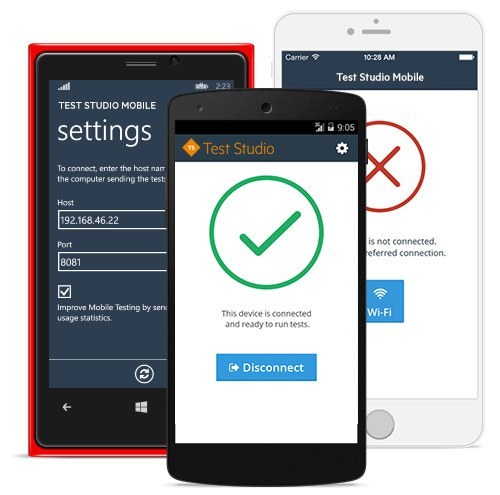
Mobile App Testing with Telerik Test Studio

Over the last few years, Mobile Applications development has grown exponentially. QA needs to ensure that every mobile application meets high quality. Testing mobile applications is complex and difficult compared to desktop and web applications. In mobile world, with frequent OS upgrades, new devices support, it is really complex to test mobile apps and to automate testing.
We will be able to solve these kind of issues with Telerik Test Studio Mobile.


It allows developers to write automated functional tests in JavaScript using a set of APIs we devised to make the process as easy as possible. With Test Studio, we can run automated tests on real devices as well as emulators. All we need to do is to install Mobile Testing agent on the devices we need to test. Agent will take care of connecting mobile device to our test studio script.

Dec 18, 2015

AWS Device Farm for Mobile App Testing

We have different types of mobile devices. They vary in the form factor, OS and various types of apps (native, hybrid, mobile-web) used in them.

Ref: http://www.flurry.com/sites/default/files/blog-images/SizeMatters_Chart2-resized-600_0.png 
This creates unique challenges to QA apps developed for mobiles. It is difficult to have all these combinations of devices with us. further running automated test cases across multiple real devices is another challenge.

AWS Device Farm is one solution for that. It allows you to test iOS or Android apps of native, hybrid or mobile-web categories on physical devices of your choice in the Cloud. They offer hardware and software isolation which helps us to ensure security and comes with several attractive features such as flexible pricing, schedule your runs, execute tests in parallel, consolidate results etc. 

Ref:https://d0.awsstatic.com/product-marketing/Mobile/DeviceFarm-productlandingpage-banner.png

Dec 15, 2015

Localization testing by changing your system locale

Localization: It is the process of adapting internationalized software for a specific region or language by adding locale-specific components and translating text.